See plans

Paid once · dated · up to 4K by source

Premium IPTV, measured by what you can check

Plenty of offers call themselves premium and stop there. Premium IPTV 4K prints the meaning on a member card instead: plan, start date, end date, picture by source, screens, and the minutes until your login. Behind the card: 40,000+ live channels with British groups at the top, 120,000 films and series to watch when you like, a week of listings on UK clock time, and 4K UHD wherever the source itself is 4K.

  • Card or PayPal, a single payment, nothing on direct debit
  • Login on WhatsApp or by email, roughly 2 minutes later
  • The last day printed in your welcome message
  • A 7-day refund if no screen plays
Couple on a sofa under fairy lights, watching TV together in the evening

Up to 4Kwhere the source allows

Premium IPTV 4KMember

Member since11/26
Valid thru11/27
PlanPremium 12
Picture
HD, Full HD, 4K by source
Screens
1 at a time
Login sent
within 2 minutes
Renews
never by itself

Paid once£49Per month£4.08

Choose Premium 12

Works in these players

IPTV Smarters ProTiviMateIBO PlayerSmart IPTVXP IPTVSmart STBHot PlayerVLCKodiFire TVAndroid TV

40,000+live channels, sorted by country
120,000titles to watch on demand
2 minfrom payment to your login
7 daysrefund window when nothing plays

The member card

What makes it premium IPTV: the member card, read line by line

Every line on the member card up top is a fact you can verify once you have paid. Here is what each one means, and what the card leaves out on purpose.

The member card of a Premium 12 membership started on 5 November 2026
Card lineShown for Premium 12What it means, and how you can check it
PlanPremium 12The length you chose. All four plans open the same channels, library and picture; the number after “Premium” counts months and nothing else.
Member since5 Nov 2026Day one is the day your payment goes through, not the evening you first open a player.
Valid thru5 Nov 2027The last day, written in your welcome message. Access stops that day on every screen.
PictureHD, Full HD, 4K by sourceEach stream reaches you at the resolution it was produced in. A film made in 4K plays in 4K on a 4K set; a channel broadcast in HD stays HD.
Screens1 at a timeOne player streams at any moment. Premium 12 Duo lets two play together, inside the same home.
Login sentwithin 2 minutesCounted from the moment the payment is confirmed, at night and at weekends too.
Renewsnever by itselfNothing is scheduled to charge you again: there is no direct debit, and we hold no card details. Carrying on later is a fresh order that you decide to place.
Paid once£49, or £4.08 a monthOne amount in pounds, by card or PayPal. The monthly figure is only for comparing.
What premium IPTV does not promise on this site
  • 8K pictures. No plan sends 8K. The sharpest picture is 4K UHD, 3840 × 2160 pixels, and only on what was produced in 4K.
  • Everything in 4K. Most live channels are broadcast in HD or Full HD and arrive that way. No player can add detail that the source never carried.
  • A picture that never pauses. Several servers share the load at busy hours, yet your Wi-Fi, your line and the evening rush where you live count as well. You get the checks, not a slogan.
  • HDR and Dolby Atmos on every title. They come through when the source has them and your player and TV can show them, and not otherwise.
  • A rank. We do not call ourselves first, best or the most anything. The card is what you hold us to.

Why pin premium IPTV to a card rather than a slogan? A promise of “8K movies”, or of a stream that “never freezes”, cannot be checked from the sofa. A date, a resolution badge in the guide and the time it takes a person to answer can. The welcome message repeats the card’s lines in writing, so you keep the same record that we do.

Someone on Premium 3 and someone on Premium 24 watch the same channels in the same quality; one simply has a later “valid thru” date. Premium, here, is not a ladder with higher rungs to pay for.

Plans

Four premium IPTV memberships, the same picture in each

Premium 3, Premium 12, Premium 12 Duo and Premium 24 open the same 40,000+ channels, the same 120,000-title library and the same picture by source. They differ in three ways only: the months, the screens that can stream together and the cost of each day.

Short

Premium 3: 3 months

Three months on the full catalogue

£29.00

Equal to £9.67 per month

Three months to judge the picture

Watched on one screen at a time

  • 40,000+ live channels, UK first
  • 120,000 films and series to play on demand
  • HD, Full HD and 4K by source
  • Seven-day guide with catch-up
  • Xtream Codes login and M3U playlist
  • Support by WhatsApp and email, 24/7

Refunded within 7 days if the picture never shows

Order Premium 3

Single payment, no auto-renewal

Our recommendation

Recommended

Premium 12: 12 months

The full year, paid once

£49.00

Equal to £4.08 per month

£67 cheaper than 4 × Premium 3

Watched on one screen at a time

  • 40,000+ live channels, UK first
  • 120,000 films and series to play on demand
  • HD, Full HD and 4K by source
  • Seven-day guide with catch-up
  • Xtream Codes login and M3U playlist
  • Support by WhatsApp and email, 24/7

Refunded within 7 days if the picture never shows

Choose Premium 12

Single payment, no auto-renewal

Two screens

Premium 12 Duo: 12 months, 2 screens

Two TVs streaming together all year

£79.00

Equal to £6.58 per month

£153 cheaper than 8 × Premium 3

Watched on two screens at once

  • 40,000+ live channels, UK first
  • 120,000 films and series to play on demand
  • HD, Full HD and 4K by source
  • Seven-day guide with catch-up
  • Xtream Codes login and M3U playlist
  • Support by WhatsApp and email, 24/7

Refunded within 7 days if the picture never shows

Order Premium 12 Duo

Single payment, no auto-renewal

Longest

Premium 24: 24 months

Two years at the lowest monthly rate

£89.00

Equal to £3.71 per month

£143 cheaper than 8 × Premium 3

Watched on one screen at a time

  • 40,000+ live channels, UK first
  • 120,000 films and series to play on demand
  • HD, Full HD and 4K by source
  • Seven-day guide with catch-up
  • Xtream Codes login and M3U playlist
  • Support by WhatsApp and email, 24/7

Refunded within 7 days if the picture never shows

Order Premium 24

Single payment, no auto-renewal

  • Card or PayPal, one payment
  • Member login within 2 minutes
  • Refund window: 7 days
  • Support in English, 24/7
Premium IPTV membership prices on 5 November 2026, each paid once in pounds
PlanScreensDurationA dayA monthTotalSame months in Premium 3 terms
Premium 313 months£0.32£9.67£29—
Premium 12112 months£0.13£4.08£49saves £67
Premium 12 Duo212 months£0.22£6.58£79saves £153
Premium 24124 months£0.12£3.71£89saves £143

Which plan fits your home? Ask one thing first: will two people ever want different programmes on two screens at the same moment? If so, choose Premium 12 Duo at £79 for 12 months. If not, a one-screen plan is enough: the player can sit on several devices in the house, as long as only one of them streams at a time.

For one screen we suggest a Premium 12 membership. At £49, paid once, it comes to 13p a day (£4.08 a month), £67 below the cost of four Premium 3 orders in a row. Premium 24 brings the month down to £3.71, the sensible call once your set-up already runs smoothly. Premium 3, at £29, lets you spend three months with the picture on your own screens before choosing a longer run.

None of the four is a higher grade of premium IPTV than another: each starts the day you pay and stops on its own written date.

Picture

Premium IPTV picture quality: HD, Full HD and 4K by source

Resolution belongs to the source, not to the plan. Here is what each step between the studio and your sofa needs for the sharpest version to reach you.

HD and Full HD

Most live channels are made in HD or Full HD and arrive that way; clean Full HD looks sharp from the sofa.

4K UHD

3840 × 2160 pixels, wherever the channel or title was itself made in 4K. They are marked as 4K in the lists, so you know before you press play.

HDR and Dolby Atmos

Brighter highlights and sound from overhead pass through only if the source includes them and your player and TV can both decode them. Miss one link and you see the standard version.

50 frames a second

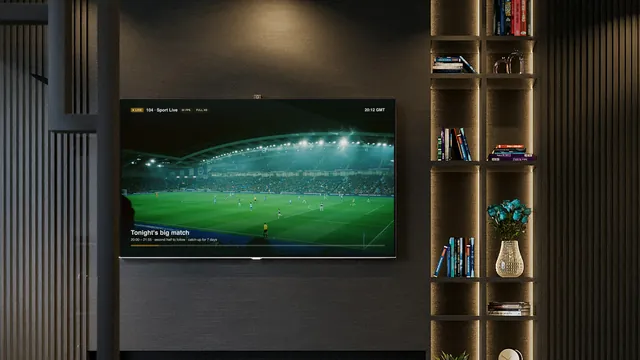
Live sport runs at 50 fps where the source allows, so a fast ball or a moving car stays smooth. Let the device match its output to the frame rate.

Dark modern lounge with the wall TV showing a live match through an IPTV player50 fps on live sport, where the source allows
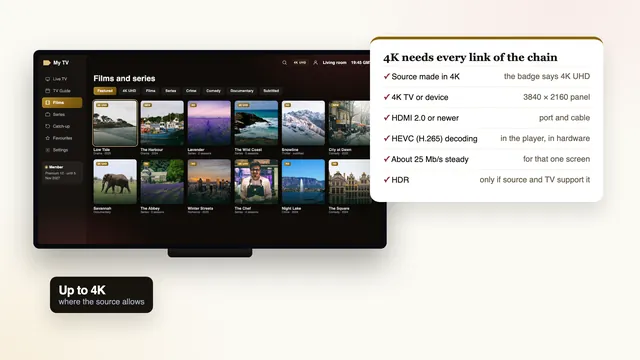
What a 4K picture asks of your home
Six links between a premium IPTV stream in 4K and your screen
Link in the chainWhat 4K needsIf it falls short
The sourceA channel or title made in 4KIt plays at its own resolution, HD or Full HD
The TVA 4K (UHD) panel; for HDR, a set that supports that HDR format4K is scaled down to the panel’s own resolution
HDMI port and cableHDMI 2.0 or newer at both ends4K can fall back to a lower setting and HDR is lost
The player deviceHEVC (H.265) decoded in hardwareThe 4K version stutters or will not start
Broadband25 Mb/s, steady, per 4K screen (Full HD: 10; HD: 5)Pauses and reloading, mostly in the evening
The roomEthernet, or 5 GHz Wi-Fi with the router in the same or next roomDrop-outs when the signal crosses walls or floors

Measure the speed on the device that will play, at the hour you usually watch. Lines across the country slow down between roughly 19:00 and 23:00, more so on weekend nights and when a big match is on, so a lunchtime reading flatters most connections. On Premium 12 Duo the two screens add up: two 4K pictures at once want about 50 Mb/s. If the figure falls short, HD and Full HD still play on the same login.

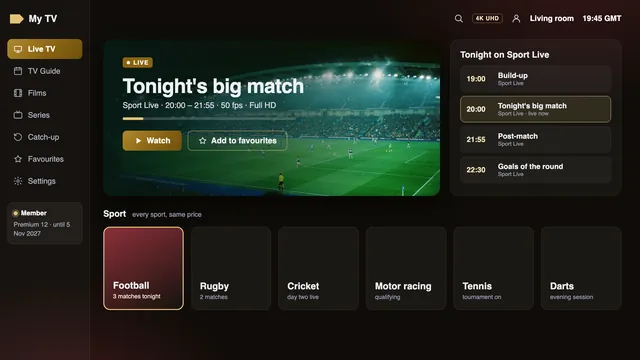
Sport screen of an IPTV player: a live match at 50 frames per second and the evening schedule
A live match at 50 frames per second, with the evening’s sport listed beside it

Live pictures trail the broadcast by a few seconds, at times by about half a minute; that is normal for streams sent over broadband.

Settings for each kind of device are in the premium IPTV guide to 4K and HDR. If a stream keeps stopping and starting, the checks for a picture that pauses list what to look at in the home before you message us.

What is on

What premium IPTV includes: 40,000+ channels, 120,000 titles and a week of listings

No channel names appear on this page, only the groups you will find and the tools around them: the library, the guide and catch-up.

UK groups first

Channels are sorted by country, then by category, and the British groups open the list. Other countries follow, each with its own folders.

Entertainment, drama and box sets

Evening entertainment, comedy and quiz shows, with separate groups for drama and for the series you follow week by week.

News and documentaries

British news at the head of its group, world news under each country, and documentary channels on nature, history and science.

Sport

Football and rugby, cricket, snooker and darts, golf, tennis, boxing and motor racing, in a UK sport group and in each country’s own sport folder.

Kids and music

Groups for younger and older children that a parent can pin as favourites, and music channels for the background.

Regional

Regional editions with their local news, placed after the national groups so they are easy to reach.

Mother and daughter on the bed watching TV, the remote in handKids' groups a parent can pin

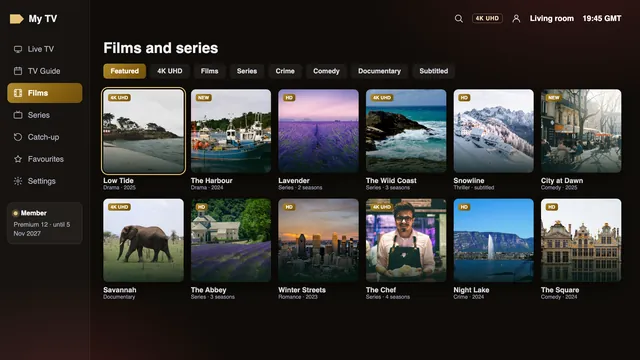
120,000 films and series on demand. Most are in English; for the rest, subtitles can be turned on in the player. Films sit in genres, series in seasons and episodes, and a good player picks up where you paused. Nothing in the library is charged per title: it comes whole with every plan.

Film and series library of an IPTV player, with a row of titles in 4K
The on-demand library, with a row of titles produced in 4K

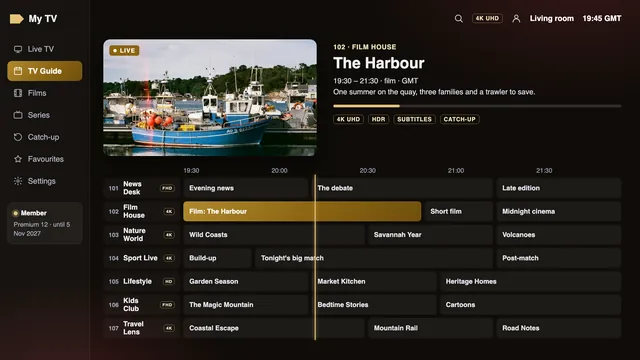
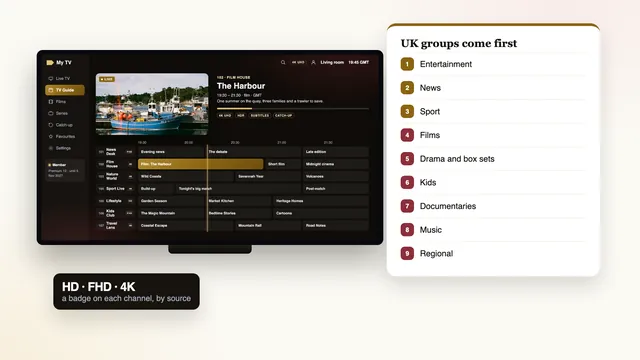
A 7-day guide in UK time. The listings arrive together with the Xtream login and keep to British clock time: GMT through the winter, and BST from the clocks going forward on the last Sunday in March until they go back on the last Sunday in October; on the date this page was last checked, UK clocks were on GMT. Should the guide sit an hour adrift after a change, shift the “EPG time offset” in the player’s settings by an hour.

Seven-day programme guide of an IPTV player in UK time with HD, FHD and 4K badges
Seven days of listings on UK clock time, each one marked HD, FHD or 4K

Catch-up. Where a channel supports catch-up, its recent programmes stay available to replay, typically for up to 7 days. The guide flags those listings with a symbol that differs between players.

Looking for one channel in particular? Name it in your first WhatsApp message and the team will tell you which group carries it before you pay. The guide to how the premium IPTV channel list is laid out explains the folders and how to keep a short favourites list.

Ordering

Ordering premium IPTV in six steps, from WhatsApp to the player

There is no basket here, no account to create and nowhere on this site to type a card number. A person reads your order and sends a secure link back.

  1. 01

    Choose a plan and press Order

    Every plan card carries its own Order button. Pressing it starts a WhatsApp chat with the team instead of loading a checkout. Email works too: write to contact@premiumiptv-4k.co.uk with the plan’s name.

  2. 02

    Send the pre-written message

    The chat opens with your order already typed, for instance “Premium 12 (12 months, £49)”. Check it, add a question if you have one, and send.

  3. 03

    Receive a secure link to pay

    A reply comes from the team, in English, carrying a link to the payment company’s own page, which accepts debit or credit card or PayPal. Your card details go on that page and are never sent to us.

  4. 04

    Pay once and approve it

    Most UK banks ask you to confirm in their app, with a code sent by text or with a card reader. That is the whole payment: no deposit, and nothing to follow.

  5. 05

    Receive your welcome message

    Within about 2 minutes of the payment being confirmed, whatever the time, your login lands in the same chat or in your inbox, end date included.

  6. 06

    Type the login into a player

    Open a player app on each screen, choose its Xtream Codes option and enter the username, password and server URL. The team can walk you through it in the same chat.

Why a chat rather than a checkout? Every order is read by a person before a payment link is sent. So if the plan you chose does not fit your screens, or your stick has no 4K output, someone says so while you can still change your mind. Later, the same thread holds your welcome message and any help you ask for.

Midnight orders go through exactly like midday ones, because the team works 24/7 on WhatsApp and email. Ordered by email and heard nothing within a few minutes? Check junk mail, then answer the thread you already have.

Your login

Your premium IPTV welcome message, and what each line is for

It reaches your WhatsApp or inbox roughly 2 minutes after the payment clears.

The welcome message is the membership itself. Save it, star it in WhatsApp or keep the email: it holds the login, the links and the date on which it all stops.

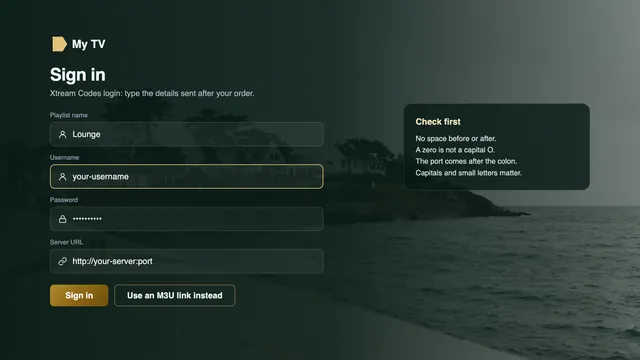
User and Pass. Your username and password, both case-sensitive. Phone keyboards like to start with a capital letter; switch that off before typing, or the player will refuse the login.

Portal URL. The server address, shaped like http://your-server:port; copy the colon and the port number too. Username, password and this address are the three parts of an Xtream Codes login, the first choice in most players.

M3U playlist. One long link that lists every channel and title. Use it in players without an Xtream login screen: VLC, Kodi through its add-on, or Smart IPTV.

Guide data (EPG). The XMLTV address of the 7-day guide. An Xtream login fetches it by itself; with the M3U link, paste it into the player’s guide setting.

Membership ends. The last day of your plan, written in full. Nothing is charged on that date; the login simply stops working.


Your welcome message, within 2 minutes of payment

User
p8k-•••••
Pass
••••••••
Portal URL
http://your-server:port
M3U playlist
…/get.php?…type=m3u_plus
Guide data (EPG)
…/xmltv.php?…
Membership ends
the date in your welcome message

Hidden here on purpose: your own values arrive in the message only.

A player that rejects the login has nearly always been given a typo: one character short, a trailing space, or a capital O in place of a zero. Copy and paste when the device lets you; if it does not, ask the team for a version laid out for typing with a remote.

Xtream Codes login screen of an IPTV player: username, password and server address
Where the login goes: three Xtream Codes boxes for username, password and server address

Some players only take a playlist. For those, the premium IPTV playlist guide shows where the M3U link goes and how to attach the programme guide to it.

Screens and players

Premium IPTV on the TV, stick, phone or computer you already own

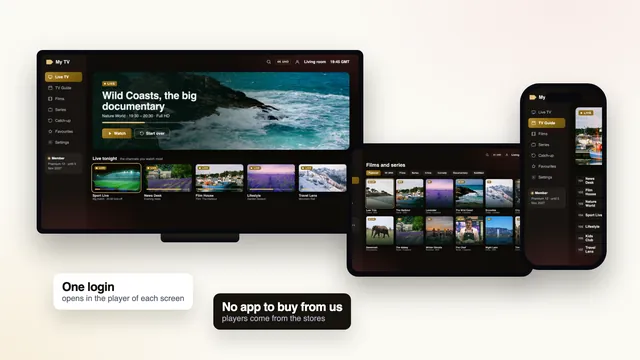
Any compatible player reads the login, so the screen decides the app. We publish no app and sell no box or stick. Choose the kind of device you have.

Which sticks show 4K

The Fire TV Cube, the Fire TV Stick 4K and the 4K Max all output 4K, plus HDR when the source carries it. The Lite and basic models stop at Full HD.

Installing Smarters Pro

You will not find it in the Amazon Appstore. Get Downloader (published by AFTVnews) from the Appstore, then in Settings › My Fire TV › Developer options give Downloader permission to install unknown apps. The link to use is sent with your login.

No Developer options?

Under Settings › My Fire TV › About, select the stick’s name seven times in a row and the hidden menu appears.

Vega OS

Some of Amazon’s newer sticks run Vega OS, which accepts Appstore apps only. Read the model name before buying a stick for this.

The TV’s own store

Smarters Pro shows up in the app store of some Samsung and LG sets but not all; the model and the country decide. Look there before anything else.

Smart IPTV

Activated once on each set. Afterwards you upload the playlist through the Smart IPTV website, matched to the MAC address shown on the TV.

IBO Player

Pairs the playlist with the set’s MAC address or its device key, then lays out channels and listings.

HDR formats

LG’s OLED and QNED ranges handle Dolby Vision; Samsung sets use HDR10+ and leave Dolby Vision out. If no app fits, a streaming stick or Android box on a spare HDMI input solves it.

Google Play first

Android TV and Google TV sets and boxes take their players from Google Play, IPTV Smarters Pro among them.

TiviMate

Built for Android TV and Fire TV: free to install, with paid premium extras. It accepts the Xtream login or the M3U link.

Skip forum APKs

An unknown APK picked up on a forum can carry malware. Stay with the store version of each player.

Choosing a box

A box certified for Android TV or Google TV receives Google Play and security updates. Worth checking: HEVC decoding in hardware, 4K output at 60 Hz, at least 2 GB of RAM, a network port and 5 GHz Wi-Fi.

Apple TV

Every player on Apple TV is installed from the App Store. Open Settings › Video and Audio › Match Content and turn both options on: Match Dynamic Range, then Match Frame Rate.

iPhone and iPad

Smarters Pro comes from Tech Smarters Private Limited. Downloading it costs nothing; an in-app Premium upgrade is optional, priced differently from store to store.

Mac

Smarters Pro installs on Macs with Apple silicon, and any Mac can open the M3U link in VLC.

Windows PC

Free VLC plays the M3U link straight away. Kodi can as well, once the PVR IPTV Simple Client add-on is switched on.

Android phones and tablets

Smarters Pro and VLC come from Google Play. A phone is a quick way to confirm the login works before you set up the TV.

Look-alike apps

Several apps copy the Smarters name and icon. Read the developer’s name on the store page before installing.

A new device adds no channels: everything comes through the login, whatever plays it.

The step-by-step guides for a Firestick, Android TV and Google TV and iPhone, iPad and Apple TV cover the settings that matter for a 4K picture on each.

Help

Premium IPTV help from a person, in English, at any hour

The team answers in English on WhatsApp and by email, 24/7, before you order as well as after.

WhatsApp or email

Keep using the chat you ordered on, where your order sits at the top, or write to contact@premiumiptv-4k.co.uk. A person replies, 24/7.

Before you order

Questions before paying are welcome: which player suits your TV, whether your line is fast enough for 4K, which plan fits two rooms.

What to send

The device and its model, which player you use, a photo of the screen and a speed figure taken on that device.

Money back within 7 days

Two situations bring a full refund if you raise them within 7 days of paying; the table sets them out.

When the premium IPTV refund rule applies
Your situationRefund?The reason
The login message never cameYes, in fullNothing was delivered for you to use.
Not one screen at home plays, despite the team’s helpYes, in fullThe membership cannot work in your home.
It played, then you decided against itNoYou received what you paid for.
4K stalls because the line is slower than the speed we quoted before the saleNoFull HD and HD remain watchable on that line.
You first ask after day 7NoThe rule runs for 7 days from payment.

The money returns to whichever card or PayPal account you used. Raise it within the window, on the chat or by email; the team first tries to get a picture on your screen, and refunds if none appears.

A membership belongs to one household. A login used in a second home, or published online, can be suspended, and no plan stretches to three or four screens. After your end date, ordering again gets you a different login, entered into the apps you already have.

Price check

What premium IPTV should cost: per month, per day and against pay TV

Our four plans beside prices seen on offers online in the UK on 5 November 2026 and a pay-TV contract, each turned into months and days. Market figures are ranges, and prices vary by seller.

Premium IPTV against offers seen online and pay TV, 5 November 2026
What you pay forPriceLengthEach monthEach day
Our Premium 12£4912 months£4.0813p
Our Premium 24£8924 months£3.7112p
Our Premium 12 Duo£7912 months, 2 screens£6.5822p
Our Premium 3£293 months£9.6732p
One month on its own, seen online£6.99–£221 month£6.99–£2223p–72p
Twelve months, seen online£39.99–£65, middle near £5512 months£3.33–£5.4211p–18p
Two screens for a year, seen online£96–£10012 months, 2 screens£8.00–£8.3326p–27p
Pay TV with sport and filmsfrom £60 a month18- or 24-month contract£60+£1.97+

Set side by side, Premium 12 comes in under the middle of what twelve months cost elsewhere, and Premium 12 Duo under the £96–£100 charged for a year on two screens. The shortest plan here, Premium 3, costs 32p a day; one month bought by itself runs from 23p to 72p a day.

Pay TV with sport and films is another kind of purchase. It brings fitted equipment and a contract lasting 18 or 24 months, and at the time of writing it often runs to £60 a month or more, so £720 or more over a year. With a premium IPTV membership you supply the screen, the player and the broadband; in return a year costs £49, and there is no contract to leave.

Father and son watching a film in the dark, lit by the screen13p a day on Premium 12
What a premium price should include
  • An end date in writing, so the price can be divided by a number of months
  • A way to pay that leaves you somewhere to turn: a card or PayPal
  • A refund window stated in days
  • A person who answers before the sale, not only after it
  • The full catalogue, the guide and catch-up, with no extra pack to unlock
  • The picture described by source, rather than stretched into a promise

For a closer look at the figures, the premium IPTV cost guide sets every plan against the market in more detail.

Before you pay anyone

Before you pay any seller who says “premium”: the checks

Whether you type premium IPTV or IPTV premium into a search box, the pages you find use the same few words. These checks work on every seller, us included: each warning sign on the left has a written answer on the right.

Warning signs

  • Only bank transfer, gift cards or crypto accepted
  • “Lifetime” access, with no end date anywhere in writing
  • A refund policy without a number of days, or none
  • Silence, or a dodge, when you ask something before paying
  • Twelve months for far less than the £39.99–£65 seen on offers online

Claims worth questioning

  • “8K” promised on live channels
  • Every channel said to be in 4K, whatever its source
  • A promise that the picture will never pause
  • An uptime percentage nobody can check
  • A request to pay as a personal transfer between people who know each other

What Premium IPTV 4K puts in writing

  • Payment by card or PayPal through a payment company
  • Your end date, inside the welcome message
  • A 7-day refund rule and the two cases it covers
  • Replies before you pay, on WhatsApp or by email, 24/7
  • The picture described by source, up to 4K UHD

A question sent before the sale is the cheapest check there is. Ask which player suits your TV, or what happens on the last day, then notice how long the reply takes and whether it actually answers you.

If a seller delivers nothing. A card payment, debit or credit, can be disputed with your card issuer as a chargeback. Banks set their own deadlines, commonly about 120 days; go to the seller first. Section 75 protection, under the Consumer Credit Act, starts above £100 on a credit card, so it does not reach any plan here, though a chargeback can still be requested. Bank transfers, gift cards and crypto leave no one to ask at all.

Reviews help too, if you know what to look for. Reading a premium IPTV review explains which details make one useful and which checks no review can do for you.

Reviews

What members say about their membership

The selection of channels is impressive. I particularly enjoy the entertainment, sports and international categories.

Jack Anderson

Lots of films and TV series to explore. The VOD selection offers a nice variety of entertainment.

Jessica Taylor

I was looking for a service with British and international channels. The range of available categories is interesting.

Thomas Wilson

Easy to understand and compatible with the streaming setup I use. I particularly like the movie selection.

Lily Robinson

A good entertainment selection with sports, documentaries and international programmes all in different categories.

Ethan Wright

The VOD catalogue has plenty of options for different tastes. I especially enjoy browsing the films and series.

Mia Thompson

FAQ

Premium IPTV questions, answered in plain words

What is premium IPTV?

Television that reaches a player app over your broadband rather than through an aerial, a dish or a cable box: live channels, on-demand films and series, listings and catch-up. On this site, premium IPTV means what the member card states: pictures up to 4K where the source allows, a week of listings on UK time, a person to help at any hour and a fixed term paid once.

Is premium IPTV here in 8K?

No. 8K is not a picture format we send. The sharpest picture is 4K UHD, wherever the channel or film itself was made in 4K; most live channels arrive in HD or Full HD.

How much does a premium IPTV membership cost?

Three months on Premium 3 cost £29; a year on Premium 12 costs £49; a year with two screens together on Premium 12 Duo costs £79; two years on Premium 24 cost £89. Each is one payment by card or PayPal, and nothing is charged later.

What broadband speed does premium IPTV need?

Allow 25 Mb/s per 4K screen, 10 for Full HD and 5 for HD, steady, measured on the device doing the playing. A cable to the router is the safest link; failing that, 5 GHz Wi-Fi with the router nearby.

Does a premium IPTV membership renew by itself?

Never. With no direct debit and no stored card, nothing can be taken on the end date. Access simply stops; should you want more, order again and type the fresh login into your existing players.

How quickly will I get my login?

Within roughly 2 minutes of the payment clearing, at any time of day, in the WhatsApp chat or your inbox. Nothing yet? Check junk mail, then answer on the same thread so the team can resend it.

What if nothing plays on my TV?

Tell the team first; they will go through the setup with you. If no screen at home will play even then, or the login never came, you get the full amount back within 7 days of paying. A change of heart is excluded, as is 4K on a line slower than the speed we stated before the sale.

Can two TVs watch premium IPTV at the same time?

Only on Premium 12 Duo: two streams together, in one household, for £79 a year. The other three plans stream to a single screen at any one time. Logins shared with another home or published online can be suspended.

Do you sell a premium IPTV app or box?

No. We sell a membership, not software or hardware. The login works in players from other developers, such as Kodi, VLC, TiviMate, IBO Player, Smart IPTV or IPTV Smarters Pro, on screens you already own.

Premium IPTV on a card you can read: Premium 12, £49 once

A year on one screen for 13p a day. Order it on 5 November 2026 and it ends on 5 November 2027, with no charge waiting on that date. The login reaches you in about 2 minutes.

Premium 12: £4912 months · £4.08 a month

Order